
Blogger Hacks- How To Put Widgets Label Cloud Or Widgets Tag Cloud On Blogger Sidebar
A tag cloud or label cloud for blogger is a list of all the labels used within a blogger blog displayed with style.You can see a demo of the Label cloud widget here on my site. This Tag Cloud Widget was originally developed by phydeaux3. I have just simplified and made it easier to install..
You can see a good implementation of this label cloud widget on one of our readers blog -Speak Media Blog.
First Of all Goto Your blogger Layout>Page Elements page and add a Labels Widget there..You can Do that using the Add a Page Element Option on that page.
Blogger Hacks- How To Put Widgets Label Cloud Or Widgets Tag Cloud On Blogger Sidebar
Choose to sort the labels Alphabetically when prompted.
After Adding the Label Widget Goto Layout>Edit Html (Do not expand the widget templates for the sake of easy explanation)
You will find some code similar to
<b:widget id='Label1' locked='false' title='Labels' type='Label'/>
Add Code New
<b:widget id='Label1' locked='false' title='Label Cloud' type='Label'>
<b:includable id='main'>
<b:if cond='data:title'>
<h2><data:title/></h2>
</b:if>
<div class='widget-content'>
<div id='labelCloud'/>
<p align='center'>
<script type='text/javascript'>
var cloudMin = 1;
var maxFontSize = 25;
var maxColor = [0,255,0];
var minFontSize = 10;
var minColor = [0,0,0];
var lcShowCount = false;
// Don't change anything past this point -----------------
// Cloud function s() ripped from del.icio.us
function s(a,b,i,x){
if(a>b){
var m=(a-b)/Math.log(x),v=a-Math.floor(Math.log(i)*m)
}
else{
var m=(b-a)/Math.log(x),v=Math.floor(Math.log(i)*m+a)
}
return v
}
var c=[];
var labelCount = new Array();
var ts = new Object;
<b:loop values='data:labels' var='label'>
var theName = "<data:label.name/>";
ts[theName] = <data:label.count/>;
</b:loop>
for (t in ts){
if (!labelCount[ts[t]]){
labelCount[ts[t]] = new Array(ts[t])
}
}
var ta=cloudMin-1;
tz = labelCount.length - cloudMin;
lc2 = document.getElementById('labelCloud');
ul = document.createElement('ul');
ul.className = 'label-cloud';
for(var t in ts){
if(ts[t] < cloudMin){
continue;
}
for (var i=0;3 > i;i++) {
c[i]=s(minColor[i],maxColor[i],ts[t]-ta,tz)
}
var fs = s(minFontSize,maxFontSize,ts[t]-ta,tz);
li = document.createElement('li');
li.style.fontSize = fs+'px';
a = document.createElement('a');
a.title = ts[t]+' Posts in '+t;
a.style.color = 'rgb('+c[0]+','+c[1]+','+c[2]+')';
a.href = '/search/label/'+encodeURIComponent(t);
if (lcShowCount){
span = document.createElement('span');
span.innerHTML = '('+ts[t]+') ';
span.className = 'label-count';
a.appendChild(document.createTextNode(t));
li.appendChild(a);
li.appendChild(span);
}
else {
a.appendChild(document.createTextNode(t));
li.appendChild(a);
}
ul.appendChild(li);
abnk = document.createTextNode(' ');
ul.appendChild(abnk);
}
lc2.appendChild(ul);
</script>
</p>
<noscript>
<ul>
<b:loop values='data:labels' var='label'>
<li>
<b:if cond='data:blog.url == data:label.url'>
<data:label.name/>
<b:else/>
<a expr:href='data:label.url'><data:label.name/></a>
</b:if>
(<data:label.count/>)
</li>
</b:loop>
</ul>
</noscript>
<b:include name='quickedit'/>
</div>
</b:includable>
</b:widget>
Now find
]]></b:skin>
Add CSS Label Cloud Widgets for Blogger
#labelCloud {text-align:center;font-family:arial,sans-serif;}
#labelCloud .label-cloud li{display:inline;background-image:none !important;padding:0 5px;margin:0;vertical-align:baseline !important;border:0 !important;}
#labelCloud ul{list-style-type:none;margin:0 auto;padding:0;}
#labelCloud a img{border:0;display:inline;margin:0 0 0 3px;padding:0}
#labelCloud a{text-decoration:none}
#labelCloud a:hover{text-decoration:underline}
#labelCloud li a{}
#labelCloud .label-cloud {}
#labelCloud .label-count {padding-left:0.2em;font-size:9px;color:#000}
#labelCloud .label-cloud li:before{content:"" !important}
]]></b:skin>
Save your template and now you should get a working Label Cloud On your Blog.
How to Add Label Cloud Widget For Blogger
10 February 2008
Add Label Cloud Widget For Blogger

09 February 2008
Add "Review My Blog" Widgets My Blogger
How to Add "Review My Blog" Widgets My Blogger

User reviews are one of the most valuable interactive features your site can deploy. By building trust and confidence, reviews improve conversion rates, time on site and overall site experience. Users can add their own reviews, rate reviews submitted by others and engage in threaded conversations. Please take note that when you make a review, you are reviewing that specific url.
Below you can click to see the demo and please give this widget or my site a review.
How to Add "Review My Blog" Widgets My Blogger
The HTML code:
<div class="js-kit-rating"></div>
<div class="js-kit-comments"></div>
<script src="http://js-kit.com/reviews.js"></script>
For google powered blogs:
+/- See the Demo
How to Add "Review My Blog" Widgets My Blogger
07 February 2008
Add Posts Ratings Widgets for Bloggers
How To Add Posts Ratings Widgets for Bloggers

Give your readers the option to rate your blog posts.
Are you curious to know what your readers think about your site's content? By adding the outbrain rating widget you will get immediate feedback from your readers, and they will get easy and quick access to your best content. This widget works for Blogger, Wordpress, Drupal, a website/javascript, and Feedburner.
How To Add Posts Ratings Widgets for Bloggers
Steps:
- Click on "Template"
- Click on "Add page element"
- Click "HTML/Javascript"
- Copy and paste the code below
- Click "Save"
<script language="JavaScript">
var OB_platformType = 1; var
OB_demoMode = false;
var OB_langJS ='http://widgets.outbrain.com/lang_en.js';
</script>
<script src="http://widgets.outbrain.com/OutbrainRater.js" type="text/javascript"></script>
OR
You can get this rating widget here.Thanks to outbrain for providing this great widget.
How To Add Posts Ratings Widgets for Bloggers
Read More...06 February 2008
05 February 2008
Widgets Add Google Talk To Your Blogger
Widgets Add Google Talk To Your Blogger
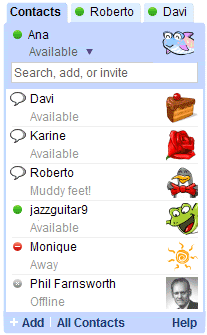
Google Talk, long a fixture in Gmail, can now be added to your blog as a gadget.
The Google Talk Gadget lets you send instant messages, transfer files, make voice calls (to other Google Talk users) and leave voicemail messages. If you paste a Picasa Web Album or YouTube URL into a chat session, the gadget gives you an instant preview of the photos and videos.


feedback widget,